
donor360:object_configuration:4addresses
Addresses
This section is for working through buttons, related lists and Lightning Pages for the Address object.
Content
Page Layouts
Separate Page Layouts exist for Organizations and Household due to seasonal address fields on the Household layout. Prepare separate layouts.
- Click Setup, Object Manager, Address
- Select Household Layout created in earlier step, Click Related Lists in the pallet
- Add or remove related lists as needed, but include:
- Affiliations
- Other lists are optional
NOTE: The Seasonal address fields are visible for the Household Page Layout.
- Click Save

- Select Organization Layout created in earlier step, Click Related Lists in the pallet
- Add or remove related lists a needed, but include:
- Affiliations
- Other lists are optional
- Click Save

Lightning Page
- Select the Custom Lightning Address Record Page previously created for both Address record types.
- Click Edit
Note: If the Dynamic Highlights Panel has not been added to the Address Lightning Page, add it now.
- Click Dynamic Highlights Panel
- Drag desired fields to the Dynamic Highlights Panel, Save

- Click Add Action button to select the buttons to display
- Set Visible Action Buttons number, Save

- From Components in left panel, drag Tabs to the left component
- Click Details tab, drag over Record Detail, Click Upgrade Now, Next
- Select Household Page Layout created in a previous step, Finish
- Click Tabs, Add Tab from right panel and add a Details tab
- Click the new Details tab, drag over Record Detail, Click Upgrade Now, Next
- Select Organization Page Layout created in a previous step, Finish* * Click Tabs, move Related tab to the last position, change Default Tab to “<First Tab>” * Set Filter on first Details tab Record> Address Type Not Equal Work, Done
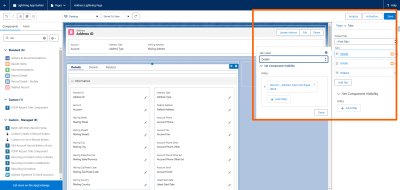 * Set Filter on second Details tab Record> Address Type Equal Work, Done
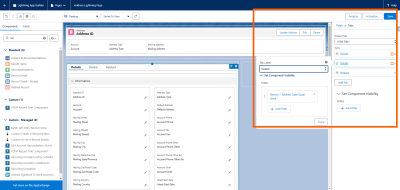 * Click Save
* Select Activate on the Page Saved popup, then Select Assign as Org Default**
* Click Save
* Select Activate on the Page Saved popup, then Select Assign as Org Default**


donor360/object_configuration/4addresses.txt · Last modified: by judy.otto